
Connect a managed AI agent to your application
Use one agent-scoped REST key from trusted server code to call the same published IMFA agent that powers your knowledge, behavior, models, tools, sessions, and customer channels. Send messages, continue API conversations, read history, and retrieve captured leads without rebuilding the agent lifecycle.
What is an AI agent API?
An AI agent API lets a trusted application communicate with an agent that already has instructions, knowledge, model settings, tools, and conversation behavior. IMFA exposes a REST interface for listing the agent available to a key, sending a chat message, continuing an API session, reading persisted messages, and retrieving captured leads.
This is an interface to a managed agent, not a direct model endpoint. You configure and publish the agent in IMFA, then your server calls it with an agent-scoped key. The same managed RAG knowledge and approved behavior can support your custom application as well as web, WhatsApp, Telegram, Discord, and eligible voice surfaces.
A production agent contract for trusted server integrations
The API provides a narrow, documented surface around a published agent while IMFA continues to manage the knowledge, behavior, model routing, sessions, credit accounting, and protection rules behind it.
Agent-scoped authentication
Generate a REST key manually in the selected agent's API view or API Keys screen. Send it as Authorization: Bearer YOUR_API_KEY. Keys are displayed once, stored only as hashes, and are different from account-scoped MCP tokens.
Idempotent chat requests
POST /v1/agents/{slug}/chat requires an Idempotency-Key of 8 to 128 permitted characters. Use a new key for each distinct turn and reuse it only when retrying the exact same request.
Reusable API conversation context
Omit sessionId to begin a new API conversation, then store the sessionId returned with the reply and reuse it on later chat turns. Website, builder, and channel session IDs listed in history are read-only for this purpose.
Sessions, messages, and leads
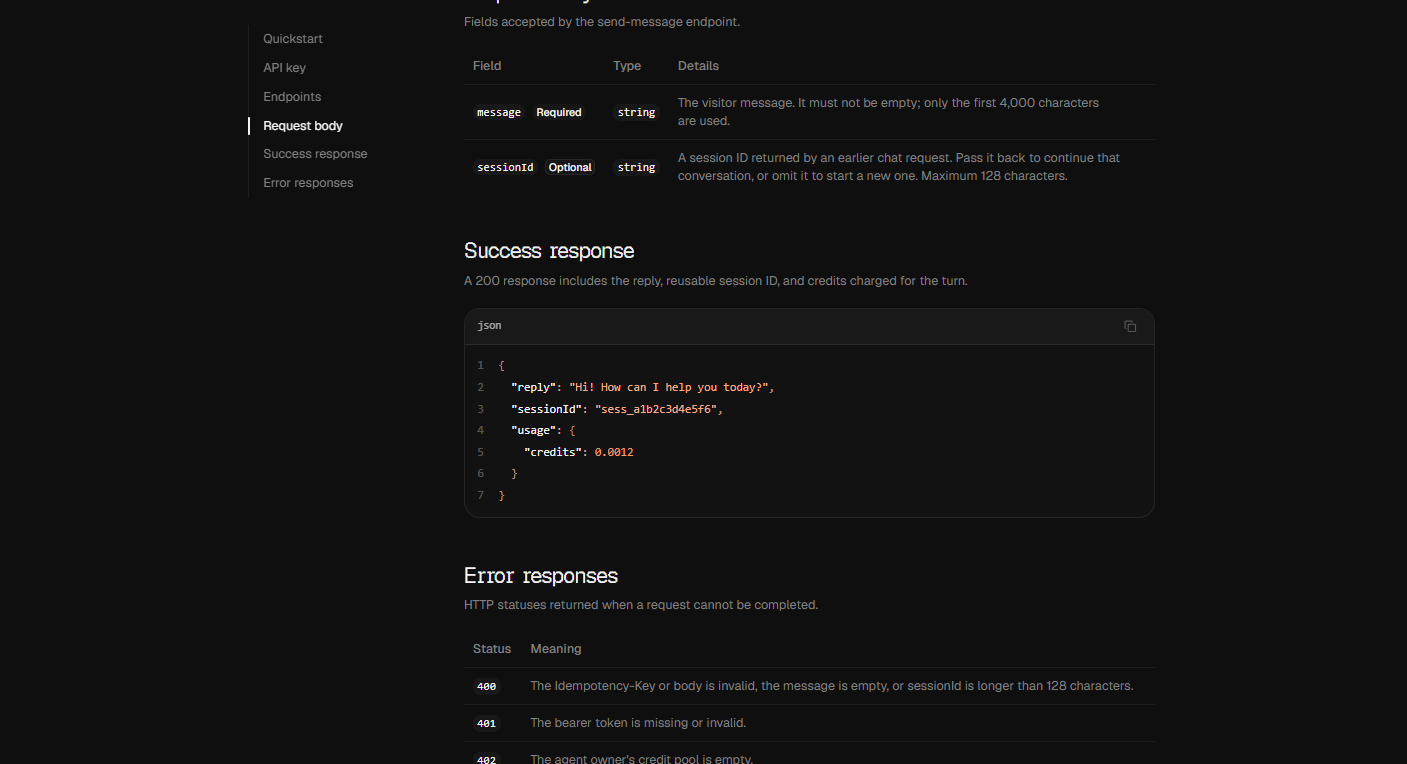
List persisted sessions, read a selected session's messages, and retrieve captured leads. Paginated GET routes default to 20 items and accept a limit from 1 to 100 plus a cursor.
Clear limits and status codes
Chat accepts a required message, uses up to its first 4,000 characters, allows an optional sessionId up to 128 characters, and limits the body to 64,000 bytes. Responses distinguish validation, authentication, credits, availability, pause, size, rate, and server errors.
The same managed agent system
API replies use the published agent's instructions, model, RAG knowledge, skills, tools, and protection boundaries. Requests consume the owner's IMFA credits and can return usage.credits with a successful reply.
How to call an IMFA agent from your server
Publish the agent first, keep its credential in a server environment variable, and design retries so idempotency and session continuity remain correct.
-
Create and publish the managed agent
Define the instructions, RAG knowledge, model, skills, tools, and safeguards in IMFA. Test realistic questions and publish explicitly before expecting the REST endpoint to serve the agent.
-
Generate and protect the scoped key
Open the agent API view or https://www.imfa.app/app/api-keys, generate the key manually, and save it in a trusted server environment variable such as IMFA_API_KEY. Never place it in browser code, mobile bundles, public repositories, logs, or chat messages.
-
Send an idempotent server-side request
Call fetch('https://site.imfa.app/v1/agents/{slug}/chat') with POST, Authorization: Bearer plus the server key, Content-Type: application/json, a unique Idempotency-Key, and JSON containing message plus an optional sessionId. Store the returned reply, sessionId, and usage.credits.
IMFA Agent API compared with a raw model API or custom build
The right choice depends on which layer your team wants to own. IMFA exposes an already managed customer agent, while a raw model API provides lower-level generation primitives.
A raw model API maximizes engineering control
Choose a model provider directly when you need to own prompts, RAG ingestion and retrieval, session storage, tool policy, authentication, rate limits, channel adapters, observability, billing, deployment, security, and every lifecycle decision.
Coding agents help build custom software
Codex and Claude Code can create bespoke applications and integrations. They can also manage IMFA agents through MCP, while your production server uses the separate agent-scoped REST key to serve customer requests.
IMFA provides the managed agent lifecycle
Choose IMFA when your application should call an agent whose knowledge, behavior, channels, sessions, leads, model options, protection rules, publishing state, and usage are already managed in one interface.
Five REST endpoints, one published agent
The base URL is https://site.imfa.app/v1. Every request needs the agent-scoped bearer key, and chat must come from trusted server infrastructure.
List the available agent
GET /v1/agents returns the agent available to the scoped key so a server can confirm its published integration target.
Chat with the agent
POST /v1/agents/{slug}/chat sends a message and returns reply, a reusable sessionId, usage.credits, and replay information when applicable.
Read conversations
GET /v1/agents/{slug}/sessions lists persisted conversations, and GET /v1/agents/{slug}/sessions/{sessionId}/messages reads one session's messages.
Retrieve captured leads
GET /v1/agents/{slug}/leads returns captured lead records through the same cursor-based pagination contract used by the other list endpoints.
Frequently asked questions about the AI Agent API
Exact answers about authentication, trusted server use, idempotency, sessions, RAG behavior, credits, and rate limits.
Can I call the AI agent API directly from a browser?
No. The REST key spends the owner's credits and must remain in a trusted server environment. The API is not intended for direct browser use and does not expose broad public CORS access. Your browser should call your own protected server endpoint instead.
How do I authenticate an IMFA Agent API request?
Generate an agent-scoped REST key manually in the selected agent's API view or API Keys screen, then send Authorization: Bearer YOUR_API_KEY from trusted server code. An MCP token is a different credential and cannot replace the REST key.
How do I continue the same API conversation?
Omit sessionId for the first chat request. Save the sessionId returned by the API and include it in the next chat body. Only an API session ID returned by chat can continue API context; history IDs from website and channel conversations are read-only.
Why is Idempotency-Key required for chat?
It lets an exact retry return safely without treating a network retry as a new conversational turn. Use a fresh 8 to 128 character key for each distinct message and reuse it only for the same request.
Does the Agent API use my RAG knowledge and tools?
Yes. It calls the published managed agent, including its instructions, selected model, RAG knowledge, skills, tools, and security boundaries. Availability and behavior still depend on the agent's published configuration, credits, and current service limits.
What happens when the API is rate limited or out of credits?
A request can return 402 when the owner's credit pool is empty or 429 when rate limited. For 429, wait for the Retry-After duration. Handle all documented statuses and remember that a failed generation can still return a sessionId on an internal error.