Create an AI agent with a ready customer chatbot
Tell IMFA's Agent Builder what your business or client needs. It creates a managed AI agent with a ready customer-facing assistant that answers questions from approved knowledge and can serve the website, WhatsApp, Telegram, and Discord.
Built for real customer questions
What is an AI chatbot builder?
.webp)
An AI chatbot builder is commonly understood as software for creating an assistant that answers customer questions through chat. In IMFA, the builder is the Agent Builder. It turns a plain-language business request into a managed AI agent, and that agent includes a ready customer-facing chatbot as one of its delivery surfaces.
The business owner, agency, or implementation partner builds and manages the agent. Their customers use the finished assistant to ask questions, find information, and share contact details. Those end customers do not build the agent. They interact with the ready chatbot powered by its approved instructions, RAG knowledge, model, skills, and publishing controls.
The Agent Builder creates the system behind the chatbot
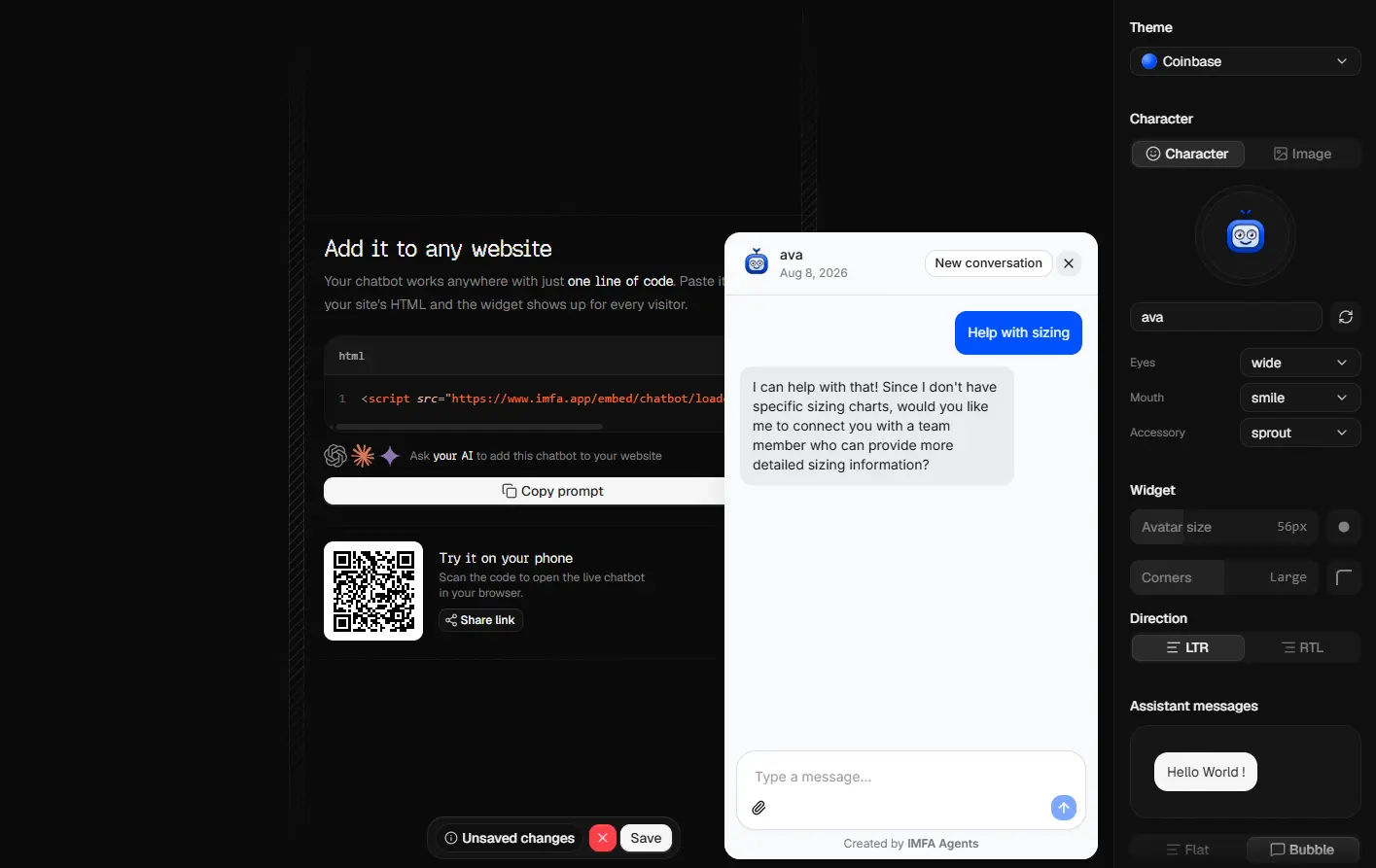
The chatbot is the ready conversation interface your customers see. The managed agent behind it provides the knowledge, behavior, tools, sessions, channels, and controls your team operates.
An Agent Builder that builds the agent
A ready assistant for your customers
Answers grounded in your knowledge
The same assistant across customer channels
Customer conversations and qualified leads
Voice and custom API access
How to create a customer assistant with Agent Builder
Build the managed agent first, review the ready chatbot second, and publish the customer experience only when both the answers and boundaries are ready.
- 01
Describe the agent's customer job
Ask the Agent Builder for a support assistant, sales assistant, lead qualification agent, product guide, or community assistant. Include who the business serves, what customers ask, the tone, boundaries, and desired next action.
- 02
Review the agent and its ready chatbot
Add the business knowledge, choose the model and skills, refine the agent's instructions, and match the included chatbot to the brand. Test questions exactly as a real customer would ask them.
- 03
Publish the assistant for customers
Fix weak answers before publishing, then place the ready chatbot on the website or connect the published agent to WhatsApp, Telegram, Discord, eligible voice, or a trusted server application.
Choose the right AI model for your chatbot
Power your chatbot with managed models from OpenAI, Claude, Gemini, Kimi, or DeepSeek. Switch models as your support, sales, or customer experience needs evolve.
- OpenAI
- Claude
- Gemini
- Kimi
- DeepSeek
- More models soon
A ready agent assistant compared with a manual chatbot build
A custom chatbot can be appropriate for a specialized product. IMFA is for a business or agency that wants the Agent Builder to create the managed system and provide a ready assistant for customers.
Not a separate chatbot-only builder
Beyond a raw model API call
Works with custom development
One managed agent, multiple customer-facing assistants
Your team manages the agent in IMFA. Customers only see the ready assistant on the surface where they already communicate with the business.
Telegram assistant
WhatsApp assistant
Discord assistant
Voice and API
Simple, clear plans
Start free, move to Pro for more capacity and model control, or choose a Custom plan shaped around your needs.
.webp?tr=w-384,q-60,f-webp)
Standard
For building and testing agents with a light weekly workload.
- Build and publish AI agents
- 5 included credits each week
- Default AI models
Pro
For active agents that need more knowledge, model control, and capacity.
- Everything in Standard
- Remove the IMFA Agents watermark from chatbots
- 100 included credits each month
- Add any website to your agent's knowledge
- Custom AI models
- Purchase as many credits as you need, with no expiration
Custom Solutions
Custom solutions designed around your business needs.
- Custom AI agents and software solutions
- Strategy and scope built around your goals
- Tailored workflows and integrations
- Hands-on development, launch, and support
.webp?tr=w-384,q-60,f-webp)
Create and manage chatbots from your coding tools
Connect the IMFA MCP server to Codex, Claude Code, Cursor, or VS Code. Create, configure, inspect, and publish managed chatbots without leaving your development workflow.
Questions about the Agent Builder and ready chatbot
Clear answers about who builds the agent, who uses the assistant, and how the finished customer experience works.
[01]Is the chatbot itself the builder?
No. IMFA's Agent Builder is the builder. It creates a managed AI agent that includes a ready customer-facing chatbot. Your team builds and controls the agent; your customers use the finished assistant to ask questions.
[02]Who is the ready chatbot designed for?
It is designed for the customers of the business using IMFA. For example, an agency can build an agent for a store, and the store's shoppers use the ready assistant to ask about products, orders, policies, or support.
[03]Can I create the agent and chatbot without coding?
Yes. Describe the customer job in plain language, review the managed agent, add business knowledge, customize the included chatbot, test it, and publish when ready. Coding is optional for deeper server integrations.
[04]Can the customer assistant answer from business documents?
Yes. Add PDFs, Word files, spreadsheets, text, or approved public webpages to the managed agent. RAG supplies relevant context to the assistant while retrieved content remains untrusted data rather than system instructions.
[05]Can the ready assistant work beyond the website?
Yes. The same published agent can serve the ready website chatbot and supported WhatsApp, Telegram, and Discord integrations. Eligible Pro agents can also support voice, and trusted applications can use the scoped REST API.
[06]Can the assistant capture customer leads?
Yes. When a customer voluntarily shares a name, email address, or phone number, the assistant can save those details with a short conversation summary so the business understands the request and can follow up.